
Accounts payable is one of those departments that rarely gets attention until something goes wrong. Invoices pile up in an inbox, someone enters them manually into the ERP, and occasionally a duplicate payment slips through or a pricing discrepancy gets missed. It works, mostly, but it's slow, error-prone, and expensive when you factor in the labor involved.
We recently completed an invoice automation project for a distributor running Epicor P21. The goal was straightforward: take invoices arriving by email, match them automatically against purchase orders, validate the data, and push approved invoices into P21 as vouchers. What used to require a full-time person entering data can now run largely on its own, with humans only stepping in when something actually needs their judgment.
The Problem with Manual Invoice Processing
This particular client receives hundreds of vendor invoices every week. Each one arrives as a PDF attached to an email. Someone in AP opens the email, looks up the corresponding purchase order in P21, manually compares line items and prices, and then keys the invoice into the system. On a good day, this takes a few minutes per invoice. On a bad day, when there's a discrepancy or the PO is hard to find, it takes much longer.
The real problem isn't the time spent on straightforward invoices. It's that the manual process treats every invoice the same way, whether it's a perfect match or a complete mess. A simple invoice that matches its PO exactly requires the same human attention as one with pricing errors, missing items, or quantity discrepancies. That's a waste of skilled labor on work that doesn't need human judgment.
There's also the error factor. When you're entering the same type of data hundreds of times a week, mistakes happen. Transposed numbers. Missed line items. Duplicate entries when an invoice gets processed twice. These errors create downstream problems that take even more time to fix.
How the Automated System Works

The system we built handles the entire flow from email receipt to ERP entry. Here's how the pieces fit together.
Invoice Ingestion
Invoices arrive in a dedicated email inbox. Power Automate monitors this inbox and captures incoming invoices as they arrive. Each invoice PDF gets uploaded to SharePoint for storage and audit trail, and the invoice data gets extracted and normalized into a standard format.
This ingestion layer handles the messy reality of vendor invoices. Different vendors format their invoices differently. Some include PO numbers prominently, others bury them. Line item descriptions vary wildly. The normalization process standardizes all of this into a consistent structure the rest of the system can work with.
PO Matching and Validation
Once an invoice is normalized, the system looks up the corresponding purchase order from P21. This is where the real intelligence happens. The system compares the invoice against the PO across multiple dimensions:
- Vendor verification - Does the invoice vendor match the PO vendor?
- Line item matching - Do the invoice line items correspond to PO lines? The system matches by part number first, then falls back to description matching and price matching for items that don't have clean part number data.
- Quantity validation - Do invoiced quantities match what was ordered and received?
- Price verification - Are invoice prices within tolerance of PO prices?
- Receiving status - Have the invoiced items actually been received in P21?
Based on these checks, each invoice gets categorized. Invoices where everything matches get marked as ready for processing. Invoices with discrepancies get flagged for review, with specific notes about what doesn't match. Invoices with critical problems (wrong vendor, major amount mismatches) get held for manual investigation.
The Review Dashboard
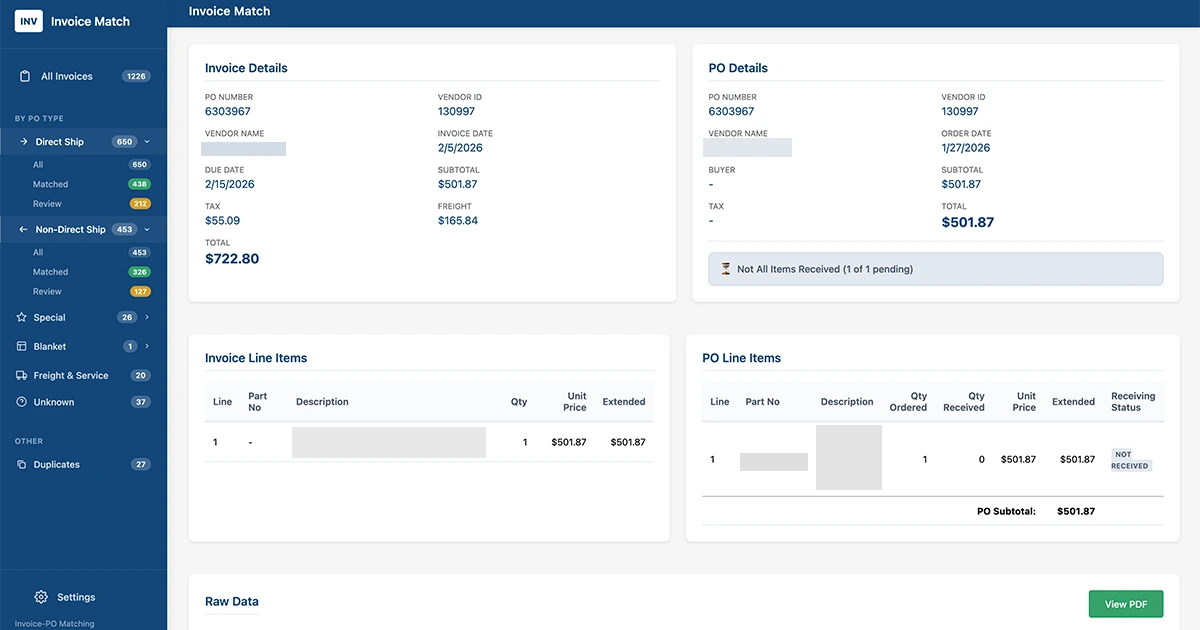
Not every invoice can be processed automatically, and that's by design. The system includes a React-based dashboard where AP staff can review flagged invoices, see exactly what discrepancies were found, and make decisions about how to proceed.
The dashboard categorizes invoices by type (direct ship, warehouse orders, special orders, blanket POs, freight and service) so staff can work through them efficiently. It shows the invoice alongside the PO data, highlighting mismatches. Duplicate invoice detection prevents the same invoice from being processed twice.
When an invoice is approved, either individually or in batch, the system pushes the data to P21 and creates the appropriate vouchers. The SharePoint record gets updated to reflect the processing status, maintaining a complete audit trail.
A Phased Approach to Automation
We didn't flip a switch and automate everything on day one. That would have been reckless. Instead, the project rolled out in phases designed to build confidence in the system.
Phase One: Human Approval
In the first phase, the system processed every invoice through matching and validation, but nothing went to P21 without explicit human approval. AP staff reviewed each invoice in the dashboard and clicked to approve. This phase was about proving that the matching logic worked correctly and building trust in the system's accuracy.
Phase Two: Batch Approval
Once the team was confident in the matching accuracy, we moved to batch processing. Invoices that matched perfectly could be approved in groups rather than one at a time. Staff would review the batch, confirm nothing looked wrong, and approve dozens of invoices with a single action. This dramatically reduced the time spent on straightforward invoices.
Phase Three: Exception-Based Processing
The final phase is fully automatic processing for clean invoices. When an invoice matches its PO perfectly and all items have been received, it flows straight through to P21 without human intervention. Humans only see invoices that actually need their attention: pricing discrepancies, quantity mismatches, missing items, or other exceptions the system can't resolve on its own.
This is where the real efficiency gains happen. The AP team focuses their expertise on problems that require judgment, not on data entry that a machine can handle faster and more accurately.
The Technical Stack
For those interested in the implementation details, the system uses a modern integration architecture. Power Automate handles email monitoring and SharePoint integration, taking advantage of existing Microsoft 365 infrastructure. The matching engine runs on Node-RED, which provides the flexibility to handle complex business logic and integrates cleanly with P21's API. The review dashboard is a React application backed by an Express API with MongoDB for storing invoice records and match results.
Everything runs in Docker containers on cloud infrastructure, with the frontend served through Nginx. The architecture separates concerns cleanly: Power Automate handles Microsoft ecosystem integration, Node-RED handles P21 integration and business logic, and the web application handles human interaction.
Results and What's Next
The numbers speak for themselves. The system now automatically processes the majority of invoices without human intervention. Invoices that used to take several minutes each now take seconds. The AP team that was buried in data entry now spends their time on vendor relationships, discrepancy resolution, and process improvement.
Accuracy improved as well. The system doesn't get tired at 4pm on a Friday. It doesn't transpose digits. It doesn't accidentally process the same invoice twice. The duplicate detection and validation logic catches problems that humans sometimes missed.
The client is already thinking about what's next. The same matching engine could handle credit memos. The integration patterns we built could extend to other document types. The dashboard could incorporate additional vendor data and payment optimization features.
That's the thing about automation projects done right. They don't just solve the immediate problem. They create a foundation for solving the next one.
Uptimize Solutions builds invoice automation and ERP integration systems for manufacturers and distributors. If your AP team is drowning in manual data entry, learn more about our integration services or contact us to discuss automating your invoice processing.